


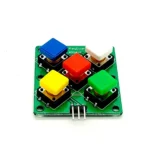
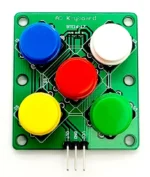

A uniquely shaped keypad with 5 color button caps. The keypad has uses a single analog pin to communicate with the microcontroller to indicate which button has been is depressed.
Description
- Analog single pin 5 button key pad
Features
- Compact design
- Simple to use
- 5 colored button caps
- Choice of 5 colors
Specification
- Operating Voltage:5V
- Interface: Analog
Package
- 1 x 5 button Analog key pad
Sample sketch
int key_val[5] ={600,650, 700, 800, 900 };
int KEYS = 5;
int key_in;
int key=-1;
int oldkey=-1;
void setup() {
    pinMode(13, OUTPUT); //we'll use the debug LED to output a heartbeat
    Serial.begin(9600); // 9600 bps
}

void loop() {
    key_in = analogRead(0); // read sensor value
    digitalWrite(13,LOW);
    key = get_key(key_in); // convert the value to key

    if (key != oldkey) // check if a different button was pressed {
        delay(50); // wait 50ms (debounce)
        key_in = analogRead(0); // read sensor value
        key = get_key(key_in); // convert sensor value to key press
       if (key != oldkey) {
           oldkey = key;
           if (key >=0){
               digitalWrite(13,HIGH);
              switch(key){
                   case 0:Serial.println("Button1 Pressed");
                   break;
                   case 1:Serial.println("Button2 Pressed");
                  break;
                  case 2:Serial.println("Button3 Pressed");
                  break;
                 case 3:Serial.println("Button4 Pressed");
                 break;
                case 4:Serial.println("Button5 Pressed");
               break;
           }
       }
    }
}
delay(100);
}

int get_key(unsigned int input){
    int k;
    for (k = 0; k < KEYS; k++) {
        if (input < key_val[k]) {
           return k;
        }
     }
     if (k >= KEYS)k = -1; // Invalid value
         return k;
}



Reviews
There are no reviews yet.